
Physical Security Integrated Management
AI Video Surveillance
CCTV and video surveillance, designed around the outcomes you need.
From reliable recording to intelligent alerts, searchable evidence and multi-site oversight.
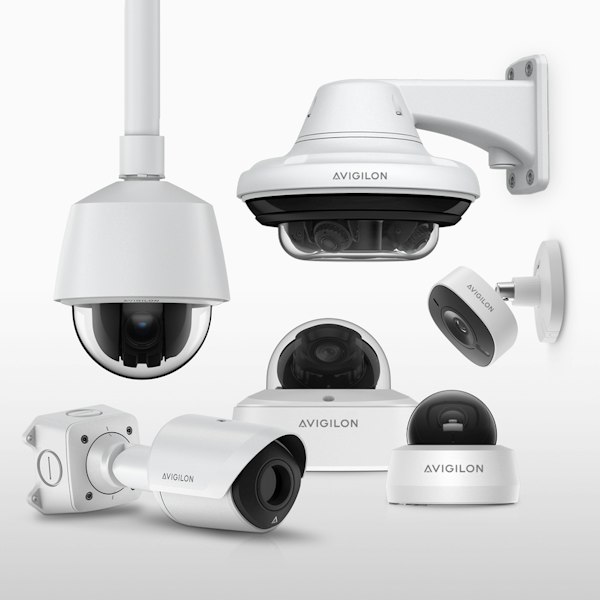
Beyond recording. Making every camera count.
Most organisations already have CCTV cameras installed. However, simply recording video does not necessarily provide effective security. Cameras may go offline without immediate detection. Recording equipment and hard disks can fail. Security operators may struggle to monitor numerous video feeds simultaneously, while locating relevant footage during an incident can become a lengthy and frustrating process. A well-designed video surveillance system changes that. The right cameras in the right places capture clear evidence, recording is sized and protected so footage is there when you need it, and AI analytics turns hours of video into real-time alerts and searchable insights for security, operations and business decisions. From a single building to hundreds of outlets, and whether you start with new cameras or the ones you already have, FAIR Technologies designs, installs and maintains CCTV and video surveillance systems around the outcomes you need.
A complete video surveillance system.
IP cameras
High-resolution cameras selected for entrances, car parks, perimeters, cash counters and other defined areas.
Recording and storage
Network video recorders, servers or cloud storage sized for camera count, image quality and retention.
Video management
One interface for live viewing, recording searches and evidence export across compatible sites.
Remote and mobile viewing
Secure access for authorised users in the control room, office or on a supported mobile app.
Network and power
PoE switches, cabling and backup power designed to support camera availability.
Connected security
Video linked with compatible access control, alarms, intercoms and perimeter detection.
Choose the right camera for each area.
| Camera type | What it does | Typical applications |
|---|---|---|
| Fixed dome and bullet | Consistent detail across a defined area | Entrances, corridors, counters and general coverage |
| PTZ | Pans, tilts and zooms to follow activity or respond to alarms | Open areas, car parks and perimeters |
| Multi-sensor and panoramic | Wide-area coverage from one mounting point | Lobbies, atriums, junctions and corners |
| Number plate recognition | Captures readable plates on moving vehicles | Car park entrances, gates and loading bays |
| Thermal | Detects heat signatures without visible illumination; conditions affect performance | Perimeters, remote sites and unlit areas |
| Low-light and wide dynamic range | Helps retain detail in low light, backlight and changing light | Glass entrances, car parks and outdoor areas |
Swipe across the table to compare all columns.
Camera selection depends on the scene, required evidence and detection objectives.
Recording, storage and retention.
Footage is only useful if it is there when you need it. We size and protect recording so evidence survives faults, tampering and time.
- On-premise, cloud or hybrid: record on site for speed and control, in the cloud for multi-site access, or both
- Retention planning: storage sized for the number of days you need to keep footage, based on camera count, resolution and recording schedules
- Redundancy: RAID storage, failover recording and backup power, to reduce the risk of recording gaps after a failure
- Evidence export: secure, logged exports for investigations, insurance claims and the police
- Health monitoring: alerts when a camera goes offline or recording stops, so faults can be addressed promptly
AI video analytics.
Traditional CCTV systems depend heavily on security personnel to observe live video or review recordings after an incident. Modern AI-powered video analytics can help transform video surveillance from passive recording into more proactive security monitoring. Instead of simply recording, your cameras recognise people and vehicles, learn what normal activity looks like for each scene, and alert your team to what matters as it happens. Investigations that once took hours of footage review can take minutes, and the same video reveals how busy your sites are, where people go and how long they wait. All of this comes from cameras you already need for security, so one investment serves security, operations and management. Depending on the selected cameras, software and analytics licences, available functions may include:
- Person and vehicle detection: find a person or vehicle across every camera by appearance, clothing colour, vehicle type or a reference photo, instead of reviewing hours of footage
- Intrusion and virtual line-crossing alerts: intrusion detection and virtual line-crossing analytics provide real-time alerts when unauthorized persons enter designated zones or cross predefined virtual boundaries within the camera's field of view.
- Loitering and unusual activity detection: detect loitering, crowding and unusual activity, with analytics that learn what is normal for each scene to reduce false alarms
- People counting and occupancy analysis: people counting and occupancy analytics deliver real-time monitoring of pedestrian traffic and occupancy levels, enabling efficient crowd management, resource optimization, and compliance with safety regulations.
- Vehicle and licence plate recognition: automate vehicle access, monitor car parks and flag vehicles on a watch list
- Object or event-based video searching: object and event-based video search enables operators to quickly identify and retrieve relevant recordings by searching for specific objects, behaviors, or predefined events captured by the surveillance system.
- Automated alerts based on defined security rules: rule-based alerting automatically triggers real-time alarms and notifications when predefined security criteria, abnormal activities, or operational events are detected within the surveillance environment.
- Operator Focus: the system highlights which cameras need attention, so each operator can cover more of your site
- Audio Analytics: detect breaking glass, alarms and other disturbances on supported cameras
- Linkage with Access Control: supported door events can be linked with video, and forced or held-open doors trigger alerts with the footage attached.
AI video analytics can help security teams identify relevant events faster, reduce unnecessary manual video review and improve situational awareness. In suitable applications, anonymised or appropriately governed analytics can also provide operational insights to support facility management and business planning.
Beyond security: insights for better decisions.
The same cameras that protect your sites can show how they are used. AI analytics turns video into data on people, vehicles and spaces, giving operations, retail and facilities teams the evidence they need to make better decisions.
- Footfall and visitor counting: measure visitors by entrance, hour and day to plan staffing, opening hours and promotions
- Heatmaps and dwell time: see which areas, displays, shelves and gym equipment attract attention, and where people linger or pass by
- Queue monitoring: alert staff when queues build at counters, checkouts or lobbies, before customers walk away
- Occupancy and space use: understand how floors, meeting rooms and car parks are actually used, to plan space and reduce costs
- Vehicle and traffic flow: track car park usage, peak times and vehicle movement around your sites
- Safety and compliance: monitor restricted and hazardous zones and site safety rules
Two routes to AI video.
Analytics can run in the camera, on a server or appliance, or through a cloud service. Many systems combine these approaches. We assess your existing cameras, budget, network and security requirements before recommending a route.
| Factor | AI-enabled cameras | AI added to existing cameras |
|---|---|---|
| Processing | Detection and classification inside supported cameras | On-site server, appliance or cloud analysis |
| Network planning | Can transmit detection metadata alongside video; bandwidth still depends on recording design | Video streams must reach the processing platform; plan network and server capacity |
| Strengths | Detection at the source, with suitable imaging hardware | Retains compatible cameras and allows central analytics upgrades |
| Considerations | Capabilities depend on the camera model and licences | Existing image quality, position and lighting affect results |
| Upfront cost | Replacement cameras and supported software | Analytics licences and server, appliance or cloud capacity |
| Best suited for | New buildings, critical entrances and major upgrades | Suitable existing IP cameras and phased improvements |
Swipe across the table to compare all columns.
The video management system brings supported video and detection data together. Heavier analytics may run centrally, depending on the platform. A phased approach can add analytics to suitable cameras first and replace cameras in critical areas over time.
Multi-site and franchise video surveillance.
For retail chains, franchises, F&B outlets, pharmacies, gyms and bank branches, the challenge is not one site but hundreds. Each outlet records its own footage, and when an incident happens, someone has to find the right recorder, ask store staff to copy the clip, and wait. Systems installed at different times by different contractors make it harder still. We design multi-site video systems that bring every outlet into one centrally managed system, so head office can monitor, search and retrieve footage from any store without being there.
- Central footage retrieval: search and export footage from any outlet from head office, without relying on store staff or site visits, with every export logged for evidence and audits
- Central monitoring: view live and recorded video from every store in one place, with alerts from all outlets sent to one monitoring team
- System health monitoring: get alerts when a camera goes offline, stops recording or is tampered with, so faults can be addressed promptly
- Role-based access: franchisees and store managers see their own outlets, area managers see their region, and head office sees everything
- One standard design for every outlet: the same cameras, positions, analytics and retention settings at every store, so new outlets open faster and data can be compared fairly
- Benchmarking across outlets: compare footfall, queues, dwell time and conversion between stores to see what top performers do differently
- Recording that suits store internet: footage is recorded in store and retrieved on demand, so outlets with limited bandwidth are not overloaded
- Consistent compliance: the same retention periods, access controls and notices at every outlet, applied under Malaysia's PDPA.
Whether you manage ten outlets or several hundred, we help you standardise new and existing stores in phases, starting with the outlets that need it most.
Upgrading from analogue CCTV.
Many sites still run analogue cameras and DVRs installed years ago. Images are low resolution, recorders fail without warning, and footage is hard to search or share. Upgrading does not have to mean replacing everything at once.
- Phased migration: upgrade critical areas first, such as entrances, cash areas and car parks, then the rest over time
- Reuse existing cabling: where suitable, existing coaxial cabling can carry IP video, reducing rewiring and disruption
- Hybrid recording: older analogue cameras and new IP cameras can be recorded and viewed together during the transition
- Ready for AI: an IP migration can prepare your system for compatible AI analytics, subject to camera quality and platform support
Applications across industries.
- Banks and financial institutions: monitor branches, ATM lobbies and cash handling zones, alert on loitering or after-hours activity at ATMs, find relevant evidence across branches for investigations and audits, and compare queues and waiting times between branches to plan staffing
- Telcos and data centres: watch unmanned and remote sites, detect perimeter intrusion before it reaches equipment, verify contractor arrivals and activity, and flag tailgating into server halls and equipment rooms when video is linked to access control
- Property developers and commercial buildings: cover lobbies, lifts, loading bays and common areas, manage tenant and visitor parking with licence plate recognition, and use occupancy and traffic data to plan security patrols, cleaning and car park capacity across buildings
- Retail and shopping malls: deter theft and resolve incidents with clear footage, measure footfall, dwell time and queues, test how store layouts and displays perform, compare visitor counts with sales to track conversion, benchmark outlets against each other to see what top-performing stores do differently, and manage every outlet from one central system
- Factories and industrial sites: secure perimeters and loading bays, alert when people enter restricted or hazardous zones, check for safety gear such as helmets and vests at entry points, monitor vehicle and forklift movement, and review incidents quickly for safety investigations
- Universities and schools: monitor campus entrances, event crowds and after-hours areas, find a person quickly across campus cameras when an incident is reported, and use occupancy data to understand how libraries, halls and car parks are used
Designed for dependable operation.
A video system is only as good as its design, which is why planning and integration matter as much as the hardware and software.
- Camera placement and image quality: angle, height, lighting and resolution determine what cameras capture and what AI can reliably detect. We survey each area before recommending cameras and analytics.
- Tuning to reduce false alarms: every scene is different. We configure detection zones, schedules and rules so alerts are meaningful, not overwhelming.
- Network and storage planning: high-resolution and AI video add load to networks and storage, so we size bandwidth, retention and recording to suit each site.
- Personal data protection: CCTV recordings that identify people may be personal data under Malaysia’s PDPA. Biometric data used for face recognition is sensitive personal data. Your Data Protection Officer or legal adviser should confirm the applicable obligations. We help you set access controls, retention periods and notices from the start.
- Cybersecurity: cameras and recorders are network devices and common targets. We segment video networks, change default credentials and keep firmware up to date as part of ongoing maintenance.
How we deliver video surveillance
- Assess: we survey your sites and audit existing cameras, recorders and networks, including readiness for AI.
- Design: we recommend the right cameras, recording, analytics and camera positions for each area, based on what you need to see and detect.
- Pilot: we prove camera positions and analytics on a selected area before a full rollout, so you can see the results first.
- Integrate: our team installs, connects and tunes the system, including integration with access control.
- Maintain: your operators learn to use search and alerts effectively, and we maintain, update and refine the system over time.
Frequently asked questions.
How long should CCTV footage be kept?
It depends on your industry, risk and internal policies. Malaysia's PDPA requires personal data, including CCTV footage, to be kept no longer than necessary, so we help you set a retention period that balances investigation needs with data protection, and size storage to match.
Can we view our cameras remotely or on a phone?
Yes. Authorised users can securely view live and recorded video from the office, control room or a mobile app, with permissions controlling who can see which cameras.
Do we need to replace all our analogue cameras?
Not necessarily. We can upgrade in phases, reuse suitable cabling and record analogue and IP cameras together, so you modernise without replacing everything at once.
Can AI work with our existing cameras?
Often, yes. AI software or an on-site AI appliance can analyse video from many existing IP cameras. Results depend on camera quality, position and lighting, so we audit your cameras before recommending this route.
Do we need to replace our video management system?
Not always. Depending on your current system, analytics can be added alongside it or connected to it. Where a system is outdated or unsupported, upgrading may be more cost-effective in the long run.
How accurate are AI alerts?
Analytics can detect people and vehicles, but accuracy depends on camera placement, lighting and tuning. We pilot and tune each system on site to keep false alarms low.
Is face recognition allowed in Malaysia?
Face recognition involves biometric data, which is sensitive personal data under the amended PDPA and generally requires explicit consent unless an applicable legal exception permits processing. Confirm your policy with your Data Protection Officer or legal advisor before using it, and we will configure the system to support those requirements.
Should we choose on-premise or cloud video management?
It depends on where your data must be stored, your network capacity and how many sites you manage. We assess these with you and recommend the platform that fits.
Can we monitor and retrieve footage from all our outlets at head office?
Yes. With a centrally managed video system, the head office can view, search and export footage from every outlet, with access controls so each franchisee or manager sees only their own stores. Retrieval speed depends on each outlet's internet connection, so we size recording and bandwidth for each store.
Talk to our team
Book a video surveillance assessment.
Planning a new system, upgrading analogue CCTV, making more of existing cameras or standardising multiple outlets? Our team will audit your cameras and recording, recommend suitable storage and analytics, and arrange a pilot before full rollout.